Chord Lab
Harmony you can touch, no theory book required.
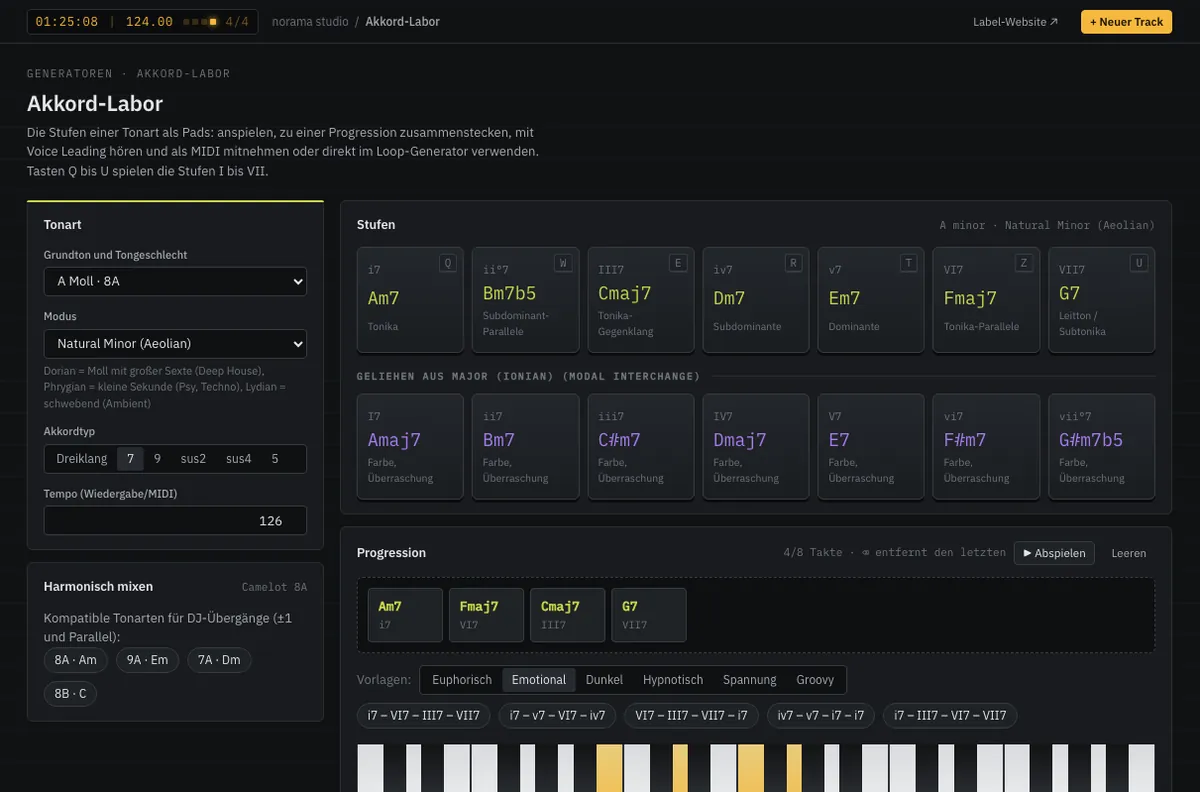
The Chord Lab lays out the seven degrees of a key as pads. Every degree sounds instantly, with smooth voice leading from the previous one. Borrowed chords from the parallel mode add colour; the Camelot wheel shows which keys work for transitions and layers.
MIDIPrototype in the studio
Play the degrees How it works
- 01
Pick a key
Root and mode — the pads show degree, chord and function.
- 02
Build a progression
Play pads and chain them, or start from mood-based templates.
- 03
Use it
Export as MIDI or hand it straight to the Loop Generator.
Play the degrees
Choose a key, click the pads or press keys 1–7.
8A · mixes with 9A · 7A · 8B
Features
- Triads, sevenths and ninths, sus2/sus4, power chords
- Voice leading: every voice takes the shortest path
- Borrowed chords from the parallel mode
- Camelot neighbours for harmonic mixing
- Templates by mood: euphoric, dark, hypnotic …
- Close, open, drop-2 and spread voicings plus inversions
- Ten rhythm patterns and a separate bass part for export
Specifications
- Degrees
- I–VII plus borrowed chords
- Modes
- 8 scales incl. harmonic minor
- Control
- Mouse or keys Q–U
- Output
- MIDI, hand-off to the Loop Generator
From the studio